> ## Documentation Index
> Fetch the complete documentation index at: https://julius.ai/docs/llms.txt
> Use this file to discover all available pages before exploring further.
# BigQuery
> Connect Julius to your Google BigQuery data warehouse and query it cost-effectively using natural language.
## What is BigQuery?
**Google BigQuery** is a fully-managed, serverless data warehouse built for fast SQL queries on large datasets. It's commonly used for analytics and business intelligence.
## Connection requirements
Unlike traditional databases that use username/password authentication, BigQuery uses **Google Cloud Service Accounts** for secure API access. You'll need:
1. A Google Cloud Project with BigQuery enabled
2. A Service Account with appropriate permissions
3. A Service Account Key (JSON file) for authentication ([how to generate](https://cloud.google.com/iam/docs/creating-managing-service-account-keys#creating))
## Providing the minimum required permissions
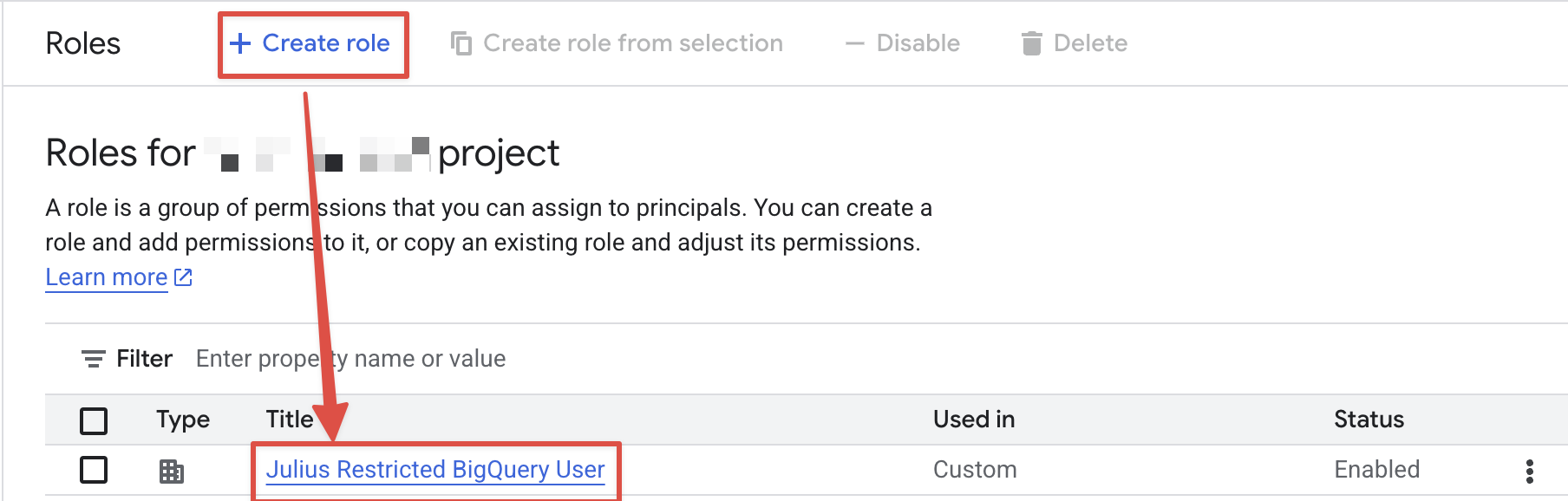
1. Navigate to the [Google Cloud Console IAM Roles](https://console.cloud.google.com/iam-admin/roles)
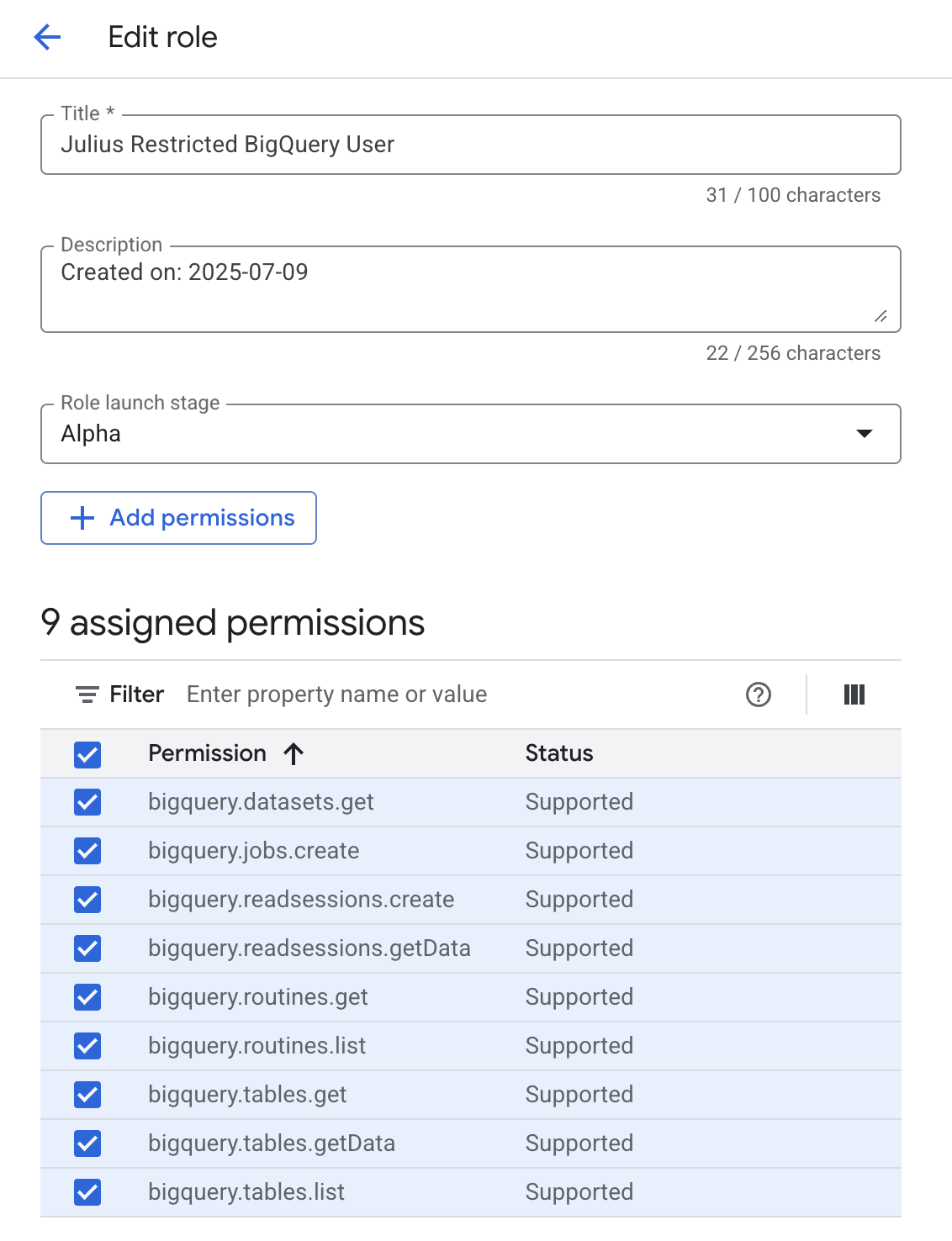
2. Create a new role with the following permissions:
### Minimum required permissions
Your service account needs at least the following permissions to work with BigQuery:
* **`bigquery.datasets.get`** — Required to access metadata about a dataset
* **`bigquery.jobs.create`** — Required to execute a BigQuery job
* **`bigquery.readsessions.create`** — Required to create a read session
* **`bigquery.readsessions.getData`** — Required to get data from a read session
* **`bigquery.tables.get`** — Required to access metadata about a table
* **`bigquery.tables.getData`** — Required to get data from a table
* **`bigquery.tables.list`** — Required to list available tables in a dataset
* **`bigquery.routines.get`** — Required to access metadata about a routine
* **`bigquery.routines.list`** — Required to list available routines in a dataset
 3. Assign the roles to the service account
 ### More granular permissions
Currently, BigQuery does not provide a way to restrict viewing *metadata* to specific tables. However, you can restrict access to viewing the *data* within specific tables. You can split these into two roles — one for metadata access and one for data access:
**Metadata role:**
* **`bigquery.datasets.get`** — Required to access metadata about a dataset
* **`bigquery.tables.get`** — Required to access metadata about a table
* **`bigquery.tables.list`** — Required to list available tables in a dataset
* **`bigquery.routines.get`** — Required to access metadata about a routine
* **`bigquery.routines.list`** — Required to list available routines in a dataset
**Data access role** (apply per-table):
* **`bigquery.tables.getData`** — Required to get data from a table
* **`bigquery.readsessions.getData`** — Required to get data from a read session
See Google's [BigQuery Information Schema Tables](https://cloud.google.com/bigquery/docs/information-schema-tables) for why these permissions are needed.
## Connecting Julius to BigQuery
1. Go to your [Julius Data Connectors Settings](https://julius.ai/settings/data_connectors)
2. Click **Create new Data Connector**
3. Select **BigQuery** from the available options
You'll see a form with the following fields:
Fields marked with an asterisk (\*) are required.
* **What it is:** A friendly name to identify this BigQuery connection
* **Example:** "Production Analytics" or "Sales Data Warehouse"
* **Tip:** Choose a name that helps you remember which BigQuery project/datasets this connects to
* **What it is:** The complete JSON content from your downloaded service account key file
* **How to use:** Open the downloaded JSON file in a text editor and copy the entire contents
* **Security:** Julius encrypts and securely stores these credentials
Make sure to copy the **entire JSON content** including the opening and closing curly braces `{ }`. Missing any part will cause authentication to fail.
* **What it is:** Multi-Factor Authentication type if your organization requires additional security
* **When needed:** Only if your Google Cloud organization has additional authentication requirements
* **Most users:** Can leave this blank unless specifically required by your organization's security policy
1. Click **Add Connection** to test the connection
2. Julius will validate your service account credentials and access permissions
3. If successful, your connector will be saved and ready to use
4. If there's an error, check the troubleshooting section below
## Using your BigQuery connector
Once your BigQuery connector is set up:
1. **Start a conversation** with Julius
2. **Ask about your data** using natural language:
* "Show me sales data from the last quarter"
* "What's the average order value by region?"
* "Create a chart showing user growth over time"
3. Julius will automatically connect to your BigQuery project, write and execute SQL queries, handle BigQuery's specific syntax and functions, and present results as tables and charts.
Julius understands BigQuery's unique features like nested/repeated fields, array functions, and standard SQL syntax. You don't need to know BigQuery-specific SQL.
## Cost-effective querying
BigQuery charges per TB of data scanned (not stored), so small prompt changes can dramatically change your bill. A few mechanics to keep in mind:
* `SELECT *` on a 100M-record table scans every column
* Unfiltered queries scan entire tables regardless of result size
* Partitioned tables let BigQuery skip irrelevant data chunks
* Clustered tables organize data for faster retrieval within partitions
* Identical queries reuse previous cached results
### Prompt for cost-effective queries
**1. Always include time boundaries.** Tables can contain years of data. Without time limits, Julius might scan everything.
"What are our sales trends?"
"Show me daily sales trends for the past 3 months"
**2. Be specific about what you need.** Vague requests lead to broader data pulls.
"Analyze our customer data"
"Show me customer purchase frequency and average order value for active customers in Q4"
**3. Use smart sampling for exploration.** When exploring patterns, perfect precision often isn't necessary.
"What patterns do you see in user behavior?"
"Analyze login patterns and session duration using a 20% sample of users from the past month"
**4. Layer your analysis.** Start broad with cost-effective queries, then drill down.
"Give me a complete breakdown of all our metrics by every possible dimension"
"Show me our top 5 product categories by revenue this quarter, then I'll dive deeper into the most interesting one"
**5. Reference existing summaries when available.** Pre-computed summary tables process orders of magnitude less data.
"What's our monthly revenue growth?"
"Using our monthly\_revenue\_summary table, show me growth rates for the past year"
### SQL-level example
**Expensive query** (might scan 3TB)
```sql theme={null}
SELECT * FROM sales_data
WHERE customer_id = '12345'
```
**Optimized query** (might scan 50GB)
```sql theme={null}
SELECT customer_id, order_date, total_amount
FROM sales_data
WHERE DATE(order_date) >= '2024-01-01'
AND customer_id = '12345'
```
### Smart prompting checklist
Before submitting your query, check:
* ✅ **Time range:** Did you specify when? (past month, Q4, last 90 days)
* ✅ **Scope:** Are you asking for specific metrics or segments?
* ✅ **Purpose:** Is this exploration (use sampling) or precision analysis?
* ✅ **Building blocks:** Can you start with a summary or build on previous work?
## Troubleshooting
* Verify you copied the complete JSON content (including `{}` braces)
* Check that the service account still exists in Google Cloud Console
* Ensure the service account key hasn't been deleted or disabled
* Confirm the JSON format is valid (no extra characters or line breaks)
* Verify the service account has at minimum the `bigquery.jobs.create`, `bigquery.tables.get`, and `bigquery.tables.list` permissions
* Check that the service account has BigQuery Job User and BigQuery Data Viewer roles
* Check if datasets have additional access restrictions
* Ensure BigQuery API is enabled in your Google Cloud project
* Confirm you're using the correct Google Cloud project
* Verify the service account has access to the specific datasets
* Check dataset regions — ensure they're in the same region or multi-region
* Confirm table names and dataset IDs are correct
* Ensure datasets aren't deleted or moved to a different project
***
Reach out to [**team@julius.ai**](mailto:team@julius.ai) for support or to ask questions not answered in our documentation.
### More granular permissions
Currently, BigQuery does not provide a way to restrict viewing *metadata* to specific tables. However, you can restrict access to viewing the *data* within specific tables. You can split these into two roles — one for metadata access and one for data access:
**Metadata role:**
* **`bigquery.datasets.get`** — Required to access metadata about a dataset
* **`bigquery.tables.get`** — Required to access metadata about a table
* **`bigquery.tables.list`** — Required to list available tables in a dataset
* **`bigquery.routines.get`** — Required to access metadata about a routine
* **`bigquery.routines.list`** — Required to list available routines in a dataset
**Data access role** (apply per-table):
* **`bigquery.tables.getData`** — Required to get data from a table
* **`bigquery.readsessions.getData`** — Required to get data from a read session
See Google's [BigQuery Information Schema Tables](https://cloud.google.com/bigquery/docs/information-schema-tables) for why these permissions are needed.
## Connecting Julius to BigQuery
1. Go to your [Julius Data Connectors Settings](https://julius.ai/settings/data_connectors)
2. Click **Create new Data Connector**
3. Select **BigQuery** from the available options
You'll see a form with the following fields:
Fields marked with an asterisk (\*) are required.
* **What it is:** A friendly name to identify this BigQuery connection
* **Example:** "Production Analytics" or "Sales Data Warehouse"
* **Tip:** Choose a name that helps you remember which BigQuery project/datasets this connects to
* **What it is:** The complete JSON content from your downloaded service account key file
* **How to use:** Open the downloaded JSON file in a text editor and copy the entire contents
* **Security:** Julius encrypts and securely stores these credentials
Make sure to copy the **entire JSON content** including the opening and closing curly braces `{ }`. Missing any part will cause authentication to fail.
* **What it is:** Multi-Factor Authentication type if your organization requires additional security
* **When needed:** Only if your Google Cloud organization has additional authentication requirements
* **Most users:** Can leave this blank unless specifically required by your organization's security policy
1. Click **Add Connection** to test the connection
2. Julius will validate your service account credentials and access permissions
3. If successful, your connector will be saved and ready to use
4. If there's an error, check the troubleshooting section below
## Using your BigQuery connector
Once your BigQuery connector is set up:
1. **Start a conversation** with Julius
2. **Ask about your data** using natural language:
* "Show me sales data from the last quarter"
* "What's the average order value by region?"
* "Create a chart showing user growth over time"
3. Julius will automatically connect to your BigQuery project, write and execute SQL queries, handle BigQuery's specific syntax and functions, and present results as tables and charts.
Julius understands BigQuery's unique features like nested/repeated fields, array functions, and standard SQL syntax. You don't need to know BigQuery-specific SQL.
## Cost-effective querying
BigQuery charges per TB of data scanned (not stored), so small prompt changes can dramatically change your bill. A few mechanics to keep in mind:
* `SELECT *` on a 100M-record table scans every column
* Unfiltered queries scan entire tables regardless of result size
* Partitioned tables let BigQuery skip irrelevant data chunks
* Clustered tables organize data for faster retrieval within partitions
* Identical queries reuse previous cached results
### Prompt for cost-effective queries
**1. Always include time boundaries.** Tables can contain years of data. Without time limits, Julius might scan everything.
"What are our sales trends?"
"Show me daily sales trends for the past 3 months"
**2. Be specific about what you need.** Vague requests lead to broader data pulls.
"Analyze our customer data"
"Show me customer purchase frequency and average order value for active customers in Q4"
**3. Use smart sampling for exploration.** When exploring patterns, perfect precision often isn't necessary.
"What patterns do you see in user behavior?"
"Analyze login patterns and session duration using a 20% sample of users from the past month"
**4. Layer your analysis.** Start broad with cost-effective queries, then drill down.
"Give me a complete breakdown of all our metrics by every possible dimension"
"Show me our top 5 product categories by revenue this quarter, then I'll dive deeper into the most interesting one"
**5. Reference existing summaries when available.** Pre-computed summary tables process orders of magnitude less data.
"What's our monthly revenue growth?"
"Using our monthly\_revenue\_summary table, show me growth rates for the past year"
### SQL-level example
**Expensive query** (might scan 3TB)
```sql theme={null}
SELECT * FROM sales_data
WHERE customer_id = '12345'
```
**Optimized query** (might scan 50GB)
```sql theme={null}
SELECT customer_id, order_date, total_amount
FROM sales_data
WHERE DATE(order_date) >= '2024-01-01'
AND customer_id = '12345'
```
### Smart prompting checklist
Before submitting your query, check:
* ✅ **Time range:** Did you specify when? (past month, Q4, last 90 days)
* ✅ **Scope:** Are you asking for specific metrics or segments?
* ✅ **Purpose:** Is this exploration (use sampling) or precision analysis?
* ✅ **Building blocks:** Can you start with a summary or build on previous work?
## Troubleshooting
* Verify you copied the complete JSON content (including `{}` braces)
* Check that the service account still exists in Google Cloud Console
* Ensure the service account key hasn't been deleted or disabled
* Confirm the JSON format is valid (no extra characters or line breaks)
* Verify the service account has at minimum the `bigquery.jobs.create`, `bigquery.tables.get`, and `bigquery.tables.list` permissions
* Check that the service account has BigQuery Job User and BigQuery Data Viewer roles
* Check if datasets have additional access restrictions
* Ensure BigQuery API is enabled in your Google Cloud project
* Confirm you're using the correct Google Cloud project
* Verify the service account has access to the specific datasets
* Check dataset regions — ensure they're in the same region or multi-region
* Confirm table names and dataset IDs are correct
* Ensure datasets aren't deleted or moved to a different project
***
Reach out to [**team@julius.ai**](mailto:team@julius.ai) for support or to ask questions not answered in our documentation.