
The best AI image generator in 2026 depends on the job. Midjourney still wins on pure artistic quality, ChatGPT and Google's Nano Banana are the easiest all-rounders, and Ideogram is the one to reach for when the picture needs readable text.
I ran some prompts through more than a dozen tools to see which ones generate images cleanly and which tools struggle with text. Here's how the top 9 stack up.
9 best AI image generators in 2026: TL;DR
- Midjourney: Best for artistic, cinematic images with deep style control.
- ChatGPT Images: Best for fast, everyday images with the easiest conversational workflow.
- Google Gemini (Nano Banana): Best for editing and for people already working inside Google's apps.
- Leonardo AI: Best for free experimentation, with 150 tokens a day at no cost.
- Adobe Firefly: Best for commercial-safe client work built on licensed training data.
- Reve: Best for prompt adherence when you need the output to match your description exactly.
- Ideogram: Best for images that need readable text inside them.
- Design.com: Best for built in branding tools, connecting AI-generated images with logos and other branded content.
- FLUX: Best for open-source control, with self-hosting and fine-tuning options.
How I tested these AI image generators
I tested each tool by generating images across common business scenarios, including product shots, mock dashboards, ad creatives, and social media graphics.
Here's what I considered:
- Image quality: Whether the output looked polished enough to use without heavy editing or a redo.
- Prompt adherence: How closely each image matched what I actually typed, especially with detailed or multi-part prompts.
- Ease of use: How quickly I could go from a prompt to a finished image without a steep learning curve.
- Editing control: How much control I had over style, composition, and small changes after the first generation.
- Value for the price: How many usable images I got for the cost of the plan, and whether the free tier was enough to actually test the tool.
From testing, I found the tools that worked best for business use gave me a strong starting image without forcing heavy prompt engineering to get there.
⚠️ A note on honesty: This is hands-on testing combined with the current state of the field, which moves fast. Prices and models change monthly, so I've linked every number to the source.
The 9 best AI image generators at a glance
| 💻 Tool 🎯 Best for 🔥 Starting price (billed annually) ⚡ Strengths | |||
| Midjourney | Artistic, cinematic images | $10/month | Best-looking output, deep style control |
| ChatGPT Images | Fast everyday images | Free / $8/month | Easiest workflow, conversational editing |
| Google Gemini (Nano Banana) | Editing and Google users | Free / $4.99/month | Best-in-class image editing |
| Leonardo AI | Free experimentation | Free / $12/month | 150 free tokens a day |
| Adobe Firefly | Commercial-safe, client work | Free / $9.99/month | Licensed training data, Photoshop |
| Reve | Prompt adherence | Free / $7.99/month | Follows detailed prompts literally |
| Ideogram | Text inside images | Free / $20/month | Best text rendering |
| Design.com | Built-in branding tools | Free / $3/month | AI Image generation and logo + branding tools |
| FLUX | Open-source control | Free (self-host) / usage-based pricing | Self-hostable, fine-tunable |
*Pricing correct as of August 2026. Verify with the vendor.
1. Midjourney: Best for artistic, cinematic images
What it does: Midjourney is a text-to-image generator built around striking, art-directed output, now available through a web app instead of only Discord.
- Best for: illustrators, concept artists, and anyone prioritizing mood and atmosphere over exact accuracy.
I tested Midjourney by asking it to generate a mock dashboard with charts, KPIs, and a data table, since that's a common need for a marketer putting together a quick visual.
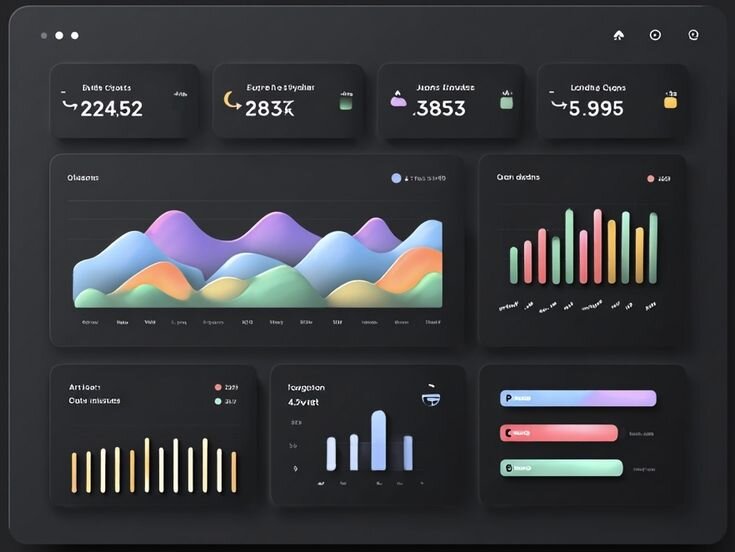
Midjourney still earns its spot for mood boards and hero images where atmosphere matters more than accuracy, just not for anything text or number heavy.
Key features
- Style range: Photoreal to painterly output, controlled through style references and parameters.
- V8.2 model: The current default model version, focused on stronger aesthetics, image quality, and personalization compared to earlier versions.
- Web app: A browser-based interface for generating images without a Discord account.
Pros and cons
| ✅ Pros ❌ Cons | |
| The output looked the most art-directed of any tool in this test | Text inside images comes out garbled or illegible in most attempts |
| Style references and parameters gave the most control over mood and composition | The training data is under an active copyright lawsuit from major studios |
| The web app removed the need for a Discord account to generate images |
Pricing
Midjourney starts at $10 per month.
Bottom line
Midjourney's public feed of other users' generations makes it the easiest tool here for browsing prompt ideas before you write your own. If you need words rendered correctly inside the image, Ideogram might be a better fit.
2. ChatGPT Images: Best for fast everyday images
What it does: ChatGPT Images generates images inside the same chat window you already use for everything else, running OpenAI's image model.
- Best for: people who want a usable image fast without learning a new interface.
I asked ChatGPT for a simple header image for a blog post about remote work, then asked it to cool down the color palette and add a coffee cup next to the laptop, all in the same conversation.

The image itself had the same smooth, slightly plastic look I've noticed in many ChatGPT-generated images, no matter the subject. It’s gotten better, but it’s still there if you look close.
Key features
- Conversational editing: Refining an image by describing the change in the same chat thread.
- GPT Image 2 model: The current image model, which reasons through a prompt before generating and renders text more reliably than earlier versions.
- Free and paid access: Available on both the free ChatGPT plan and paid plans.
Pros and cons
| ✅ Pros ❌ Cons | |
| Easy workflow, since edits happen in the same chat | Output trends toward a recognizable glossy look across different subjects |
| Text inside images renders more reliably than earlier ChatGPT models | Style control is limited next to tools built for art direction |
| Multi-turn edits kept the same subject and composition intact across changes |
Pricing
ChatGPT Images is free to use, with paid plans starting at $8 per month.
Bottom line
ChatGPT Images draws on the same broad language understanding as the rest of ChatGPT, so it recognizes specific references most image tools miss. If you want a distinct visual style over general accuracy, Midjourney might suit you more.
3. Google Gemini (Nano Banana): Best for editing and Google users
What it does: Google Gemini is Google's image model, covering both fast generation and detailed photo editing inside the Gemini app.
- Best for: quick edits, compositing, and anyone already working inside Google's apps.
To test Gemini's editing tools, I generated a water bottle product photo and then asked it to swap the plain background for a gym setting while keeping the bottle untouched.

The one thing I noticed across every edit was a faint watermark pattern in the image data, which is Google's SynthID system marking the output as AI-generated.
Key features
- In-place editing: Swapping backgrounds, objects, and styles while keeping the rest of the image unchanged.
- Two model tiers: Nano Banana 2 (Gemini 3.1 Flash Image) for fast generations, and Nano Banana Pro (Gemini 3 Pro Image) for higher-fidelity output.
- SynthID watermark: An invisible marker embedded in every generated image, identifying it as AI generated.
Pros and cons
| ✅ Pros ❌ Cons | |
| Editing held the rest of the image steady while only changing the requested part | The higher-fidelity Pro model has a lower image limit on the free plan |
| Free access inside the Gemini app covers a real amount of daily use | Visual style is less distinctive than tools built for art direction |
| Text inside images rendered clearly and accurately |
Pricing
Google Gemini is free to use inside the Gemini app, with paid plans starting at $4.99 per month.
Bottom line
Gemini grounds its image generation in Google's search data, so real-world objects and places tend to look more accurate. If you want more room to experiment with different visual styles, Leonardo AI might be a better fit.
4. Leonardo AI: Best for free experimentation
What it does: Leonardo AI is a creator-focused image platform with its own models plus access to others, including FLUX.
- Best for: people who want to try a lot of generations without paying, plus game and character asset creators.
Leonardo touts itself as giving creators full control over their AI output, so I asked it to generate a detailed product shot with specific style directions to test how far that control goes on the free plan.

Key features
- Daily free tokens: 150 tokens a day that reset every 24 hours.
- Multiple models: Access to Leonardo's own Phoenix and Lucid models plus third-party options like FLUX.
- Asset-focused tools: Features built for game textures, consistent characters, and other production assets.
Pros and cons
| ✅ Pros ❌ Cons | |
| The free plan covers a real amount of daily use | Free-tier images are visible in Leonardo's public feed unless you pay for privacy |
| Multiple models sit inside one account instead of requiring separate subscriptions | The interface has more settings and menus to learn than simpler tools |
| Asset tools cover game and character work that most general tools skip |
Pricing
Leonardo AI is free to use, with paid plans starting at $12 per month.
Bottom line
Leonardo's $12 plan comes bundled with some Canva Business subscriptions, so it's worth checking your existing tools before paying for it separately. If commercial-safe training data matters more than a generous free tier, Adobe Firefly might be a better choice.
5. Adobe Firefly: Best for commercial-safe, client work
What it does: Adobe Firefly is Adobe's image platform, built into Creative Cloud and Photoshop, now expanded into a multi-model workspace.
- Best for: agencies, marketers, and anyone who needs to show a client their images are legally clean.
I tested Firefly by generating a product image for a mock client campaign, checking how the output held up next to work I'd actually hand off to a client.
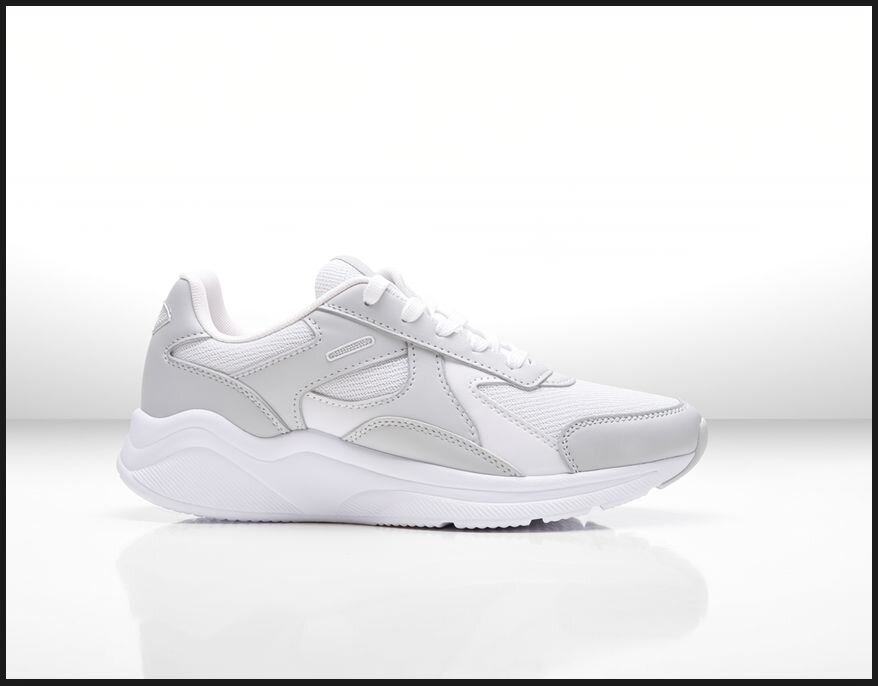
That trade-off is the whole point of Firefly: Adobe trains it only on content it owns the rights to.
Key features
- Multi-model workspace: Access to Adobe's own models plus partner models, including Nano Banana Pro, GPT Image, and FLUX.2, inside one platform.
- Licensed training data: Adobe's own models train only on Adobe Stock, openly licensed, and public domain content.
- Photoshop integration: Generative Fill and Generative Expand built directly into the editor.
Pros and cons
| ✅ Pros ❌ Cons | |
| Switching between Adobe's own model and partner models happens without leaving the platform | Adobe's own model output looked more generic next to specialist tools in this test |
| Licensed training data gives client work a clearer legal paper trail than most competitors | Free plan gets no legal copyright coverage |
| Deep integration with Photoshop and the rest of Creative Cloud |
Pricing
Adobe Firefly is free to use, with paid plans starting at $9.99 per month.
Bottom line
Firefly automatically attaches Content Credentials to every image, a labeling standard that indicates the file was generated by AI. If you want stronger visual polish out of the box, Reve might be a better fit.
6. Reve: Best for prompt adherence
What it does: Reve is an image model from an independent lab, built around following detailed instructions closely.
- Best for: people who write specific prompts and want the output to actually match them.
To test how literally Reve follows a prompt, I asked for three red boxes stacked in a column to the left of a single blue circle.
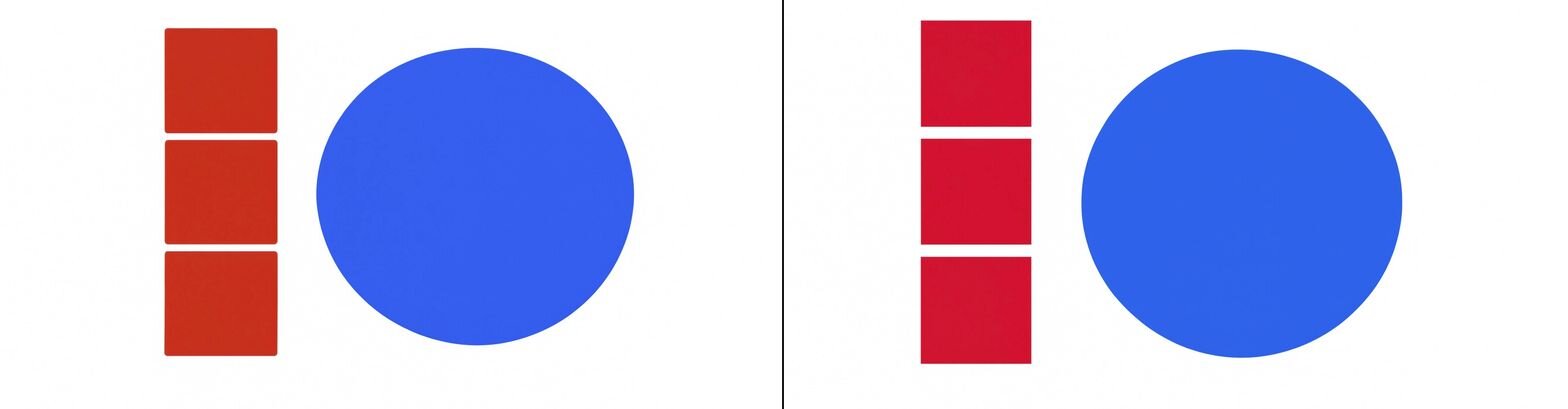
Settings and community tutorials felt thinner than tools with a longer track record, which shows up in how few workarounds exist online when something doesn't work as expected.
Key features
- Strong prompt following: Reliable results with object counts, spatial layout, and specific arrangements.
- Reve 2.1 model: The current model, built for stronger prompt understanding, text rendering, and photorealistic detail at native 4K.
- Natural-language editing: Refining an image with a written instruction instead of manual tools.
Pros and cons
| ✅ Pros ❌ Cons | |
| Prompt following held up on detailed, multi-part instructions in this test | Fewer settings and community tutorials than more established tools |
| Text rendered clearly inside generated images | Style range leans toward photorealism, with fewer stylized options than tools built for art direction |
| Natural-language editing let me revise a result without starting over |
Pricing
Reve is free to use, with paid plans starting at $7.99 per month.
Bottom line
Reve's browser extension lets you pull reference images from anywhere on the web straight into your project. If you want more manual control and self-hosting options, FLUX might be a better option.
7. Ideogram: Best for text inside images
What it does: Ideogram is an image generator built around the one thing most tools struggle with, which is legible text.
- Best for: posters, ads, logos, and social graphics where the words matter as much as the image.
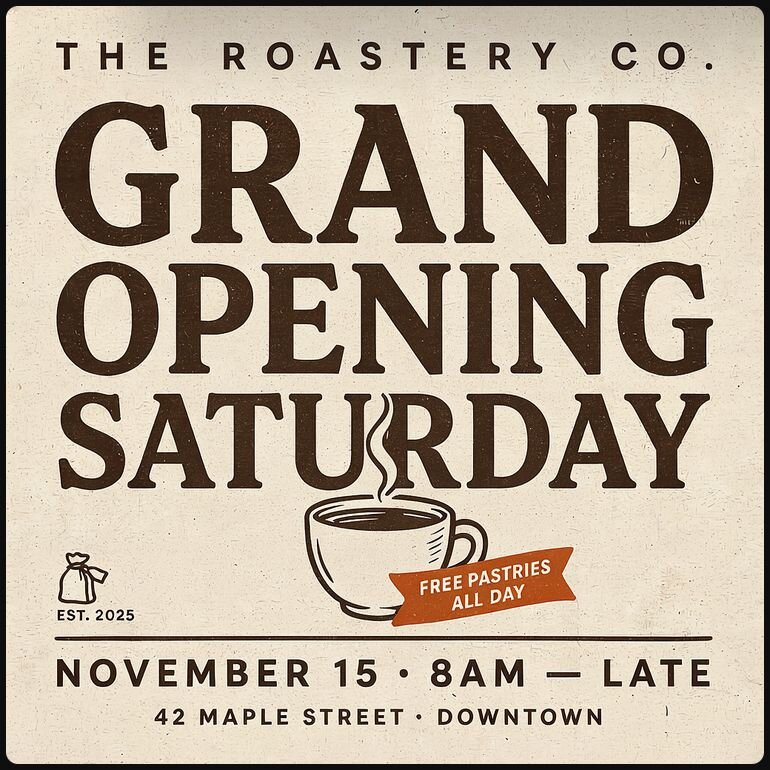
Ideogram claims 95% text rendering accuracy, so I asked it for a coffee shop poster with the headline "GRAND OPENING SATURDAY" spelled out in bold letters to see if that number held up.
Key features
- Best-in-class text rendering: Reliable spelling and layout inside the image.
- Typography controls: Settings built for logo and poster work.
- Free tier: Limited weekly credits, with full commercial rights.
Pros and cons
| ✅ Pros ❌ Cons | |
| Legible, correctly spelled text rendered on the first attempt in this test | General art quality trailed more style-focused tools in this test |
| Free tier includes full commercial rights | Free tier generations run on a slower queue |
| Typography controls give real control over logo and poster work |
Pricing
Ideogram is free to use, with paid plans starting at $20 per month.
Bottom line
Ideogram Character can lock a consistent character across multiple images from a single reference photo, without training a custom model. If you want stronger general art direction over text accuracy, Midjourney could be worth a look.
8. Design.com: Best for built-in branding tools
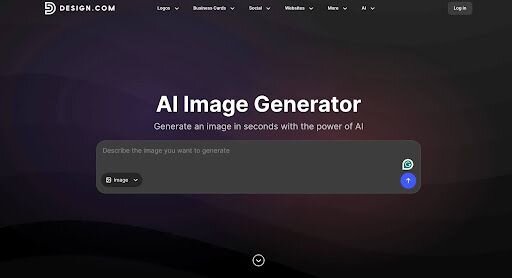
- What it does: Design.com combines AI image generation with logo creation and a wider collection of branding and design tools.
- Best for: businesses that want to generate visuals for a logo and continue building the rest of their brand in one place.
To test its AI image generator from a branding angle, I asked it to create a logo-style graphic for a fictional bakery called Golden Crumb Bakery. The prompt called for a simple wheat symbol, warm neutral colors, and a clean look that could work across different brand materials.
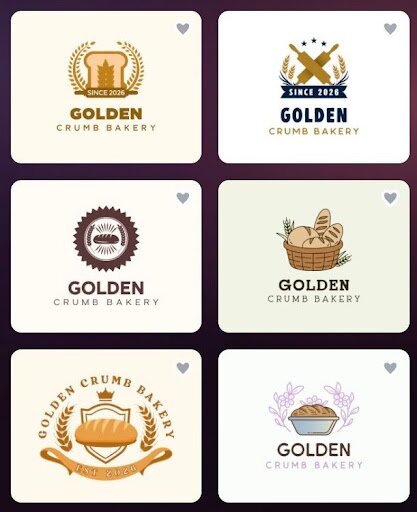
The generator returned several interpretations of the idea, giving me different visual directions for the wheat symbol, composition, and overall style. Some felt closer to finished logo concepts than others, but the variety made it easy to explore ideas before settling on a direction.
What sets Design.com apart is what comes next. Its dedicated AI logo generator and other branding tools let you take that initial visual direction further and carry it across business cards, social graphics, websites, and other materials.
Key features
- Multiple results: Generates several interpretations so you can explore different visual directions.
- AI logo generator: A dedicated tool for turning a brand direction into editable logo concepts.
- Built-in branding tools: Continue into business cards, social graphics, websites, posters, and other marketing materials.
Pros and cons
| ✅ Pros ❌ Cons | |
| Generated several different visual directions from the same branding brief | Advanced designers may want deeper controls |
| AI image generation connects naturally with its dedicated logo generator | Web-based only, no native app |
| Branding can continue across other design tools on the platform |
Pricing
Design.com is free to use, with paid plans starting at $3 per month when billed annually.
Bottom line
Design.com is especially useful when AI image generation is part of a larger branding project. You can explore visual ideas with the image generator, develop the identity further, and carry the resulting look across other branded materials in the same platform.
9. FLUX (Black Forest Labs): Best for open-source control
What it does: FLUX is a family of open and proprietary image models from Black Forest Labs, built around self-hosting and fine-tuning.
- Best for: developers and power users who want to run or customize their own model.
I tested FLUX through Black Forest Labs' free FLUX.2 [klein] playground, since that was the fastest way to see the output quality without setting up a self-hosted environment.
A detailed prompt for a still life with several objects and specific colors came back pretty accurate, though I had to wait a while for results.
I could see the output quality clearly, but that playground only shows a fraction of what the open-weight models actually do, so anyone who wants real customization or self-hosting still needs to work with the model directly.
Each change landed in the next message with no new setup or rewritten prompt, which is the entire pitch for a tool already open in another tab.
The image itself had the same smooth, slightly plastic look I've noticed in many ChatGPT-generated images, no matter the subject. It’s gotten better, but it’s still there if you look close.
Key features
- Multiple variants: FLUX.2 [pro] and [max] through the API, [dev] for non-commercial self-hosting, and [klein] 4B under an Apache 2.0 license for free commercial self-hosting (the larger 9B Klein variant is non-commercial only, like [dev]) .
- Self-hostable: The open-weight variants run on your own hardware.
- Fine-tuning: Customizing a model for a specific style or subject.
Pros and cons
| ✅ Pros ❌ Cons | |
| The free playground generated a detailed, multi-object prompt quickly with no queue | Real customization requires comfort with model weights or an API |
| Open-weight variants can run on your own hardware | No polished consumer app of its own |
| Licensing differs by variant, so a free commercial option exists alongside the paid API |
Pricing
FLUX is free to self-host, with usage-based pricing for hosted access through the API.
Bottom line
Black Forest Labs builds FLUX 3 Video on the same platform, so growing into video doesn't mean switching providers. If you want a simpler, no-setup workflow, ChatGPT Images might be a better fit.
Which AI image generators are safe for commercial use?
Most roundups skip this, and it's the question that gets people in trouble. The model being able to make an image and you being cleared to sell it are two different things.
Here's how commercial rights actually break down across the tools in this list:
| 🧰 Tool ✅ Commercial use 🔎 Training data 💡 Safe for client work? | |||
| Adobe Firefly | Yes, and Adobe covers your legal costs if an image gets challenged, on paid plans | Licensed and public domain content | Generally the clearest choice for client-facing work |
| ChatGPT, Leonardo AI | Yes, even on the free plan | Not fully disclosed | Generally fine, but Leonardo's free-tier images are public and Leonardo keeps IP ownership unless you pay |
| Midjourney | Only on paid plans | Not fully disclosed | Fine once you're on a paid plan; check the $1M revenue rule if your client is a larger company |
| Google Gemini | Unclear; sources conflict on whether the free tier grants commercial rights | Not fully disclosed | Confirm directly with Google's terms before using free-tier Gemini images for a client |
| Ideogram | Yes, even on the free plan | Not fully disclosed | A strong option, including for free-tier use |
| FLUX | Depends on the model variant and its license | Open datasets | Only with a license that explicitly allows commercial use |
💡 Note: For client work, Firefly tends to be the clearest choice among the tools here. It's the only one in this list that promises to cover your legal costs (on paid plans) if a generated image gets challenged for copyright.
Which tools actually get text right?
If your image needs readable words, only a few tools do it reliably:
- Reliable: Ideogram, Gemini Nano Banana, and ChatGPT Images..
- Unreliable: Midjourney and most open-source models still garble anything longer than a word or two.
The practical rule: For posters, ads, and thumbnails with copy, start with Ideogram or Gemini and save yourself a dozen rerolls.
How to pick the right AI image generator for your job
The job in front of you decides which tool makes sense, since no single generator wins across every use case. Match your task to the row below and start there:
| 🎯 Your job 🥇 Top pick ✳️ Runner-up | ||
| Artistic or cinematic art | Midjourney | Leonardo AI |
| Fast everyday images | ChatGPT Images | Google Gemini |
| Editing an existing image | Google Gemini (Nano Banana) | ChatGPT Images |
| Text inside the image | Ideogram | Google Gemini |
| Client-safe commercial work | Adobe Firefly | ChatGPT Images |
| Logos and vector art | Design.com | Ideogram |
| Free experimentation | Leonardo AI | Google Gemini |
| Full control or self-hosting | FLUX | Leonardo AI |
| Precise prompt adherence | Reve | Ideogram |
Pay for a plan if you generate images regularly or need commercial rights in writing. If you only make a handful of images a month, the free tiers on Gemini, Leonardo, and Ideogram will probably cover you.
For the visuals image generators can't make
The best AI image generators in 2026 can turn a prompt into art, a product shot, or a logo, but none of them can turn a spreadsheet into a chart. For many business use cases, that's the image you actually need.
Julius is built for that other job. It's a data analysis platform that takes your numbers and turns them into charts, a full analysis, and a finished presentation. All of it happens inside one workspace built for finished work.
Here's how Julius can help:
- Skip the blank dataset: Ask a question, and Julius searches for public data or pulls live financial figures for more than 17,000 companies through its Financial Datasets integration. You can also Connect warehouses like Postgres, Snowflake, and BigQuery, or upload a CSV directly.
- Build the chart: Describe what you want to see, and Julius generates the chart from your actual data, the one visual none of the tools above are built to produce.
- Go straight from analysis to deck: Turn your findings into a presentation inside Julius, with charts already placed on the slides, then export to PowerPoint, PDF, or Google Slides.
Ready to turn a question into a chart and a presentation? Try Julius for free today.
Frequently asked questions
What is the best AI image generator in 2026?
Some of the best AI image generators in 2026 include Midjourney for artistic quality, ChatGPT and Google's Nano Banana as the strongest all-rounders, and Ideogram forreadable text.
What is the best free AI image generator?
Google Gemini (Nano Banana) and Leonardo AI have the most usable free tiers, with Ideogram close behind for text-heavy images. ChatGPT's free plan works too, though it caps you after a few images a day.
Which AI image generator is best for commercial use?
Adobe Firefly is the safest for commercial use, since it's trained on licensed and public-domain content and includes IP indemnification for customers on paid plans. Most other tools allow commercial use on their paid plans, but confirm each one's terms first.
Can AI image generators create text inside images?
Yes, though only a few do it reliably. Ideogram, Google's Nano Banana, and ChatGPT's GPT Image all hold up well, while Midjourney and most open-source models still struggle with longer text.
Can AI image generators make charts or graphs from my data?
No. Image generators create art and graphics, and building a chart from a dataset takes a different kind of tool. To turn your data into a chart, use a data analysis tool like Julius or one of the other AI data visualization tools built for that job.