

Compare players, calculate your league’s scoring, and save a report built from dated stats and projections.
You can use ChatGPT for fantasy football to compare player stats, check scoring calculations, and work through roster decisions. The useful starting point is your league: its scoring rules, available players, and the week you are planning for.
Julius: Sports Stats & Fantasy brings that workflow into ChatGPT. Give it your roster, game logs, and dated projections, then ask for a comparison you can inspect. It can calculate fantasy points, create charts, and save a report explaining the inputs behind your decision.
Here is how to turn those materials into a useful start/sit, waiver, or trade analysis.
What can the Julius sports plugin do?
Julius works with uploaded files, saved Julius files, and accessible public sources. For fantasy football, that includes calculating points under PPR, half-PPR, or custom rules; comparing game logs; and evaluating roster scenarios using available rankings and projections.
It can also prepare a draft cheat sheet or a player comparison report. The same sports workflow supports other leagues when suitable data is available, including NBA player comparisons and fantasy basketball.
The information you provide determines the analysis. A file upload does not automatically connect your fantasy account, and a published report does not update itself when an injury announcement changes the outlook. Use dated sources and refresh the inputs when your decision depends on new information.
1. Start with your league settings and decision
Open the Julius sports plugin in ChatGPT, connect your Julius account, and provide the files you want to analyze. A spreadsheet or CSV is a practical starting point.
Include the information that can change the answer:
| Input | What to include |
| League settings | Reception points, yardage and touchdown values, bonuses, roster positions, and eligibility |
| Your roster | Player names, teams, positions, bench options, and the lineup slot you are deciding |
| Historical data | Season, weeks covered, games played, and definitions for each stat |
| Projections | Source, capture date, target week or season, and the scoring format they assume |
State one decision clearly. “Compare these two receivers for my final flex spot this week” gives the analysis a useful scope. A trade question needs a different view, including which starters would change and which player would leave your roster.
If you already use Julius for data analysis, this is the same basic habit: define the question before choosing the chart.
2. Check the inputs before ranking players
Ask Julius to inspect the files first. Player names can differ across exports, a missing value can be mistaken for zero, and totals can cover different numbers of games.
A useful first request is:
Inspect these files before making a recommendation. Confirm the season, weeks, player identities, games played, and scoring settings. Flag duplicate rows, missing values, and projections that use a different scoring format. Tell me what would prevent a fair comparison.
For recent performance, use the same date range and show both games played and per-game results. For a future lineup decision, keep historical production separate from the projections. One describes what happened; the other estimates what might happen under stated assumptions.
If you combine projection sources, retain their names and timestamps. Ask Julius to explain the combination rule instead of silently treating conflicting values as interchangeable.
3. Calculate points using your rules
Reception scoring can change a comparison. ESPN’s scoring guide explains the difference between PPR and non-PPR formats, but your own league settings should determine the calculation.
Consider these fictional receiving lines:
| Fictional player | Catches | Receiving yards | Receiving touchdowns |
| Player A | 9 | 72 | 0 |
| Player B | 2 | 80 | 1 |
| Player C | 5 | 90 | 0 |
For this example, use 0.1 points per receiving yard and 6 points per receiving touchdown. Add zero, half a point, or one point per catch. Exclude all other scoring categories.
Player A scores 7.2 points without reception points, 11.7 in half-PPR, and 16.2 in full PPR. Player B scores 14.0, 15.0, and 16.0 respectively. The leading player changes in full PPR, even though the underlying stat lines stay the same.
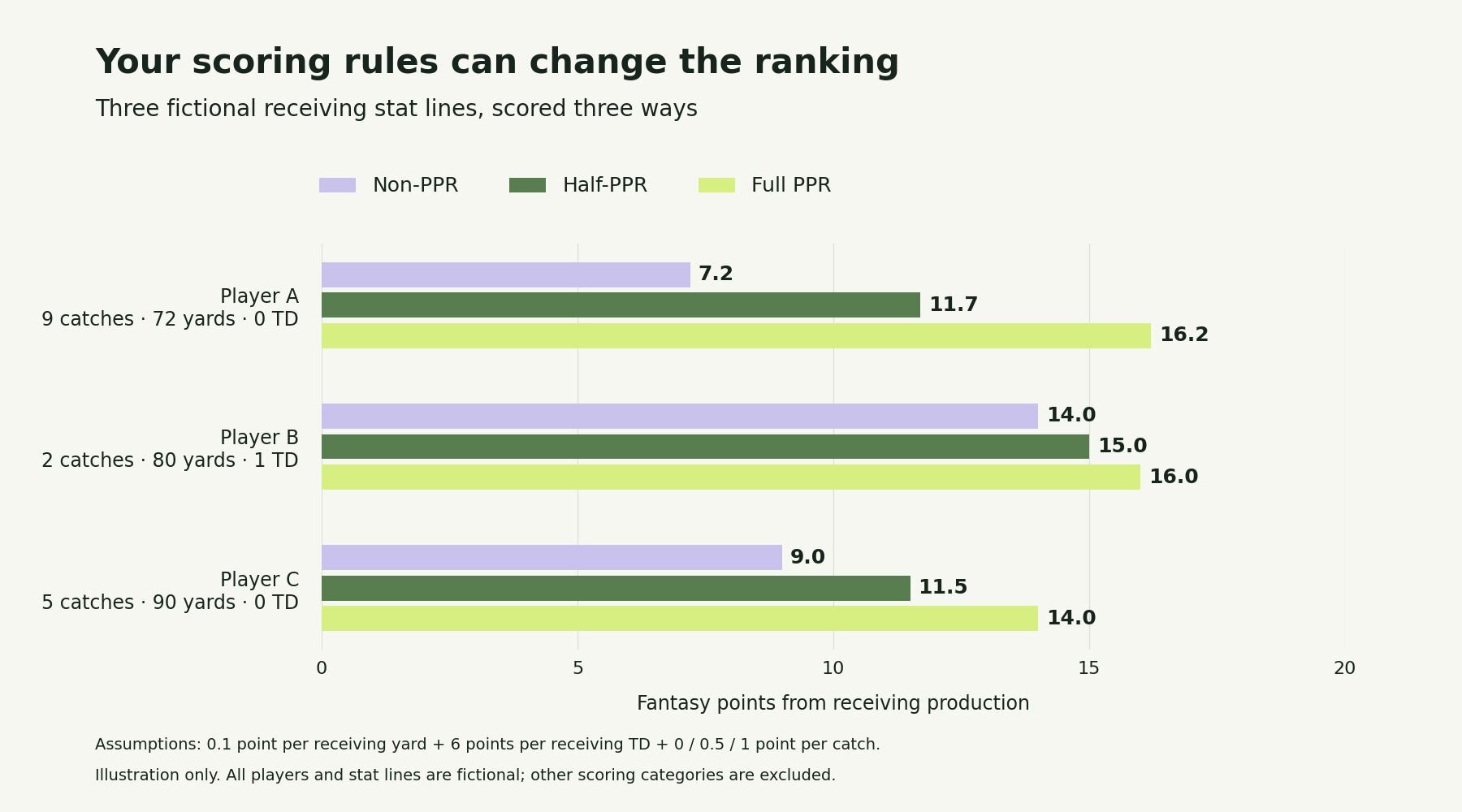
Illustrative receiving-only scoring. All players and stat lines are fictional, and the chart is not a set of current projections.
Ask Julius to show the formula and calculate one row explicitly before processing the full file. Then check the output against that row. For a larger comparison, a grouped bar chart from the Julius graph maker can make the effect of different scoring rules easy to see.
4. Match the analysis to the roster decision
Start/sit: compare the actual lineup choices
Supply your eligible players, open roster slot, scoring settings, and dated projections. Ask for the projected-point difference and the assumptions most likely to change the choice.
Recent averages can provide context, but they should not be presented as this week’s forecast. If the file lacks injury status or expected availability, identify that gap and check a current source before setting your lineup.
Trades: evaluate the starting lineup afterward
Using Julius as a fantasy football trade analyzer starts with both sides of the trade and your roster constraints. Ask it to compare your likely starting lineup before and after the trade using the same projection source and horizon.
Include the player you would drop and any replacement you would need. Adding up the values of two incoming players can be misleading when only one can enter your starting lineup.
Waivers: compare additions with your alternatives
Provide the available-player list and your current roster. Ask which candidates improve a specific slot, what the comparison assumes, and which missing information could change it.
Waiver availability and ownership percentages need a source. If they are absent, Julius can compare the supplied candidates without presenting the list as the complete current waiver pool.
5. Save the comparison with its sources
Ask for a short report containing the decision, scoring rules, source dates, comparison table, and key uncertainties. Keep historical stats and projections in separately labeled columns.
Save the report and its supporting data so you can revisit the calculation when new information arrives. The Julius AI report generator is also useful when you want to develop the analysis into a longer written report in Julius’s workspace.
If you want to share a finished file publicly, ask Julius to publish it and return a link. Include a visible data-as-of date, and regenerate the report when you refresh the inputs.
A fantasy football prompt to reuse
Julius, compare the players in these files for my final flex spot. Use my attached scoring settings and the projections dated [date] for [week and season]. First check player identities, eligibility, missing values, and scoring compatibility. Keep historical results separate from projections. Show projected points, the difference between candidates, and the assumptions that could change the choice. Do not invent injuries or availability. Save a comparison table and a short report with the sources and dates.
Replace the bracketed details and attach the actual files before running the analysis.
Frequently asked questions
Can ChatGPT help with fantasy football?
Yes. With the Julius sports plugin and suitable inputs, it can calculate scoring, compare players, and explain roster scenarios. The quality of a current recommendation depends on the freshness and completeness of the information used.
Does Julius connect automatically to my fantasy league?
Uploading a roster does not create a live connection to your league account. Provide the roster, settings, and available-player data needed for the question, and refresh those inputs when they change.
Can I use custom fantasy scoring?
Yes. Provide the complete scoring rules, including bonuses or position-specific differences. Ask Julius to show the calculation for a sample player before ranking the full list.
Can Julius guarantee the best lineup?
No. Projections are estimates, and player outcomes remain uncertain. Use the analysis to understand tradeoffs and verify the inputs behind your decision.
Ready to compare your own roster? Open Julius: Sports Stats & Fantasy in ChatGPT, add your settings and dated data, and start with the decision you need to make.