

Solve equations, explore calculus, and check statistical results with worked steps, graphs, and a calculation you can save.
A math answer is easier to trust when you can see where it came from. Which assumptions did the calculation use? Does the answer satisfy the original equation? Does the graph agree with the algebra?
You can use Julius: Math Solver & Stats in ChatGPT to work through those questions. The plugin supports equations, calculus, probability, statistical tests, and graphs, with Python available for calculations. You can also save the method and results as a document to review later.
This guide shows a useful sequence: state the problem, request worked steps, check the result, and save the explanation. The example below is an original illustration with independently checked arithmetic, so you can follow the method before trying it on your own work.
Open Julius: Math Solver & Stats in ChatGPT.
What can the Julius math plugin help you solve?
The plugin covers several types of mathematical work:
- Algebra: equations, systems, factoring, and checking candidate solutions.
- Calculus: derivatives, integrals, limits, and supported differential equations.
- Probability: conditional probabilities, combinations, expected values, and distributions.
- Statistics: descriptive measures, suitable hypothesis tests, confidence intervals, and effect sizes.
- Graphs: functions, distributions, relationships, and fitted models.
Julius's broader AI math solver page introduces the math workflow. Here, the focus is using the dedicated plugin inside ChatGPT and reviewing its output.
The right method still depends on the question. An equation may have no real solution, a calculus problem may need an approximation, and a statistical test may be unsuitable for the data you supplied.
1. Connect the plugin and define the problem
Open the plugin listing, install it, and connect your Julius account when prompted. Start a new chat and ask to use Julius: Math Solver & Stats. You can also select an installed plugin by typing @, as described in OpenAI's plugin guide.
Then give the complete problem. Include parentheses, units, the domain, and any required precision. For an equation, say whether you want real or complex solutions. For a word problem, define each variable. For statistics, explain what one row represents and how observations were collected.
Try this prompt:
Use Julius: Math Solver & Stats to solve sqrt(x + 6) = x over the real numbers. State the restrictions, show the algebra, and check every candidate in the original equation. Explain any rejected answer.
This request makes verification part of the task. “Solve this” leaves more of those choices unstated.
2. Check candidates against the original equation
Consider the equation from the prompt:
sqrt(x + 6) = x
The square root is nonnegative, so a solution must have x ≥ 0. Squaring both sides gives:
x + 6 = x²
Rearrange and factor:
x² − x − 6 = 0, so (x − 3)(x + 2) = 0.
That produces two candidates, 3 and −2. Substitution into the original equation decides which one works.
| Candidate | Original left side | Original right side | Result |
| x = 3 | sqrt(9) = 3 | 3 | Valid solution |
| x = −2 | sqrt(4) = 2 | −2 | Reject: the sides differ |
The solution is x = 3. The value −2 satisfies the squared equation but fails the original one.
This is a useful habit for any ChatGPT math solver workflow: ask which transformations could change the candidate set, then check the final answer using the original statement. For equations with denominators, inspect excluded values. For logarithms and square roots, inspect the domain.
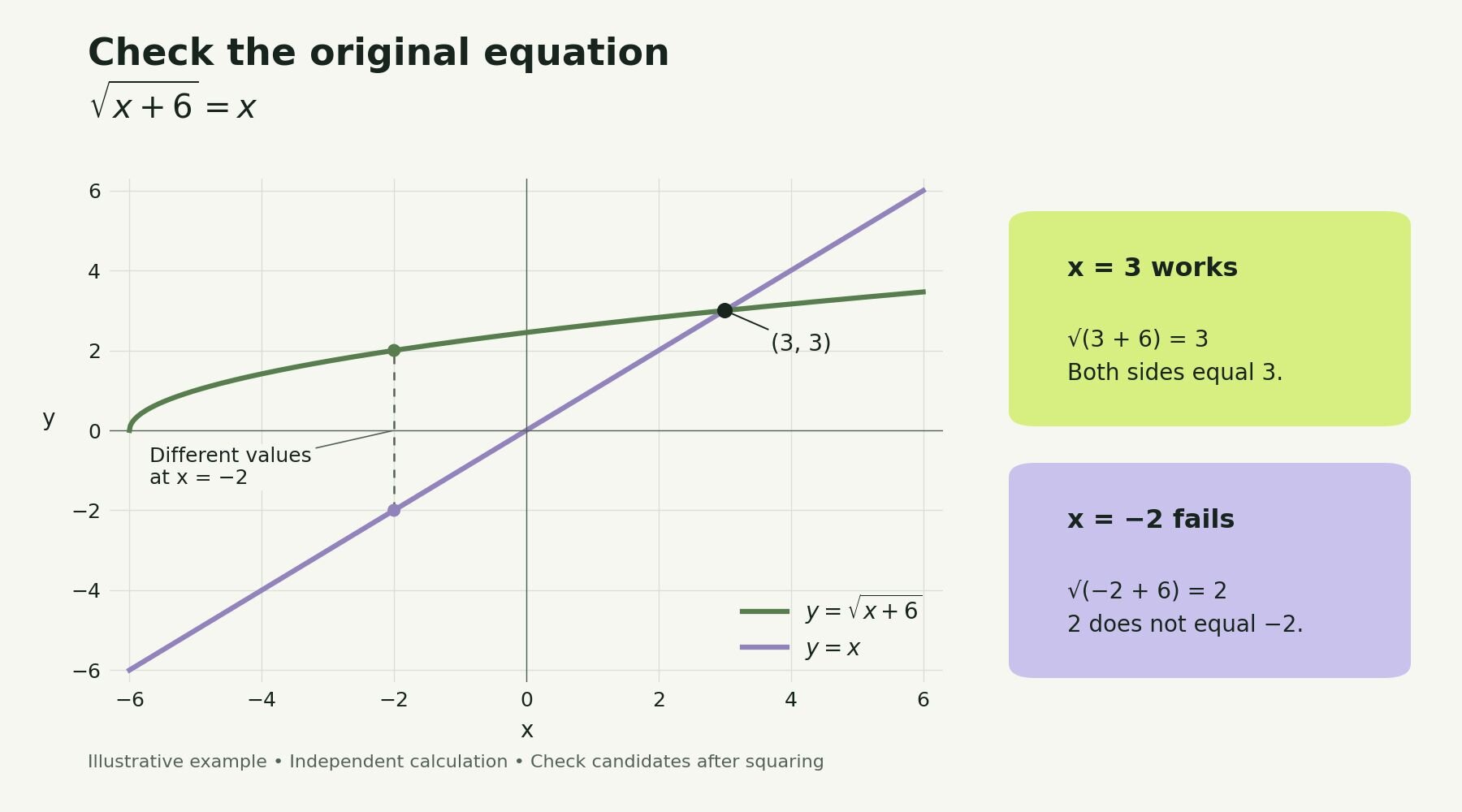
Check a candidate in the original equation: x = 3 works, while x = −2 fails. Independently computed illustrative example.
The plot shows y = sqrt(x + 6) and y = x meeting at (3, 3). At x = −2, their values differ, which makes the rejected candidate easy to inspect.
3. Use a graph to inspect the explanation
A graph gives you another way to examine a result. It can help you see an intersection, turning point, or change in behavior that is hard to follow in several lines of algebra.
Follow-up prompt:
Plot both sides of the original equation from x = −6 to x = 6. Label the curves and the valid intersection. At x = −2, show the two different y-values and explain why that candidate fails.
Check the axis labels and range. A narrow plot can hide behavior outside the displayed interval, and a visually close intersection does not establish an exact answer. Keep the substitution check alongside the picture.
If you want more ways to present a mathematical result, Julius's graph maker covers charts and visualizations in the main workspace.
4. Extend the workflow to calculus and statistics
For calculus, specify the function and the question you want the graph to answer. You might ask for an exact derivative, its values at selected points, and an explanation of increasing and decreasing intervals.
Calculus prompt:
Differentiate f(x) = x³ − 3x. Find the stationary points, classify them, and check the derivative numerically away from those points. Plot the function and derivative separately. Label exact results and approximations.
For statistical work, explain the study design before naming a test. “Compare these columns” does not tell Julius whether the observations belong to the same people or two unrelated groups.
Statistics prompt:
These before-and-after measurements come from the same participants, identified by ID. Check pairing, missing values, and the differences. Explain whether a paired t-test is appropriate. If it is, report the sample size, mean change, confidence interval, p-value, and a clearly defined effect size.
A paired test works with related observations; SciPy's paired t-test documentation describes the calculation and its confidence interval. Suitability still depends on the data and assumptions. Ask Julius to explain what the result supports, and keep practical importance separate from statistical significance.
For more on this use case, see Julius's AI statistics solver.
5. Save the method with the answer
A saved solution is more useful when it contains enough context to reproduce the work. Ask for the original problem, inputs, restrictions, method, checks, and chart. For numerical work, include the precision and any simulation settings.
Save prompt:
Save a PDF explaining the original problem, the worked solution, the rejected candidate, and the labeled graph. Include a short checklist I can use to check a similar equation. Keep the file private.
The plugin supports saved explanations and calculation files, including PDF, Word, and Markdown. Request a public link separately if you want to share the finished work. A saved result should make clear which values were supplied, calculated, or assumed.
Frequently asked questions
Can ChatGPT solve math problems step by step?
You can ask ChatGPT to use Julius for calculations and worked explanations. Specify the level of detail and require a check of the final answer. Review the reasoning as well as the result, particularly when the problem contains domain restrictions or approximations.
Can Julius solve every equation exactly?
No. Some equations have no solution in the requested domain; others need numerical methods. Ask for an exact expression when available and a labeled approximation when it is not. SymPy's equation-solving guide explains the distinction between algebraic and numerical approaches.
Should I use the math plugin or the Excel plugin?
Choose Math Solver & Stats when the main task is an equation, mathematical method, probability question, or statistical explanation. Choose Excel & Data Analysis when the main task is organizing a workbook, fixing spreadsheet formulas, or producing business analysis.
Can I reuse the graph and explanation?
Ask Julius to save the chart and worked explanation in the format you need. Before sharing, check that labels, assumptions, and source inputs are included. Those details help another reader follow the calculation.
Work through your next problem with Julius
Start with one complete problem and ask for the calculation, a check, and an explanation you can revisit. Add a graph when it makes the reasoning clearer, then save the finished work.