

This Decktopus review comes from hands-on testing: I generated decks from prompts, ran the brand import on a live site, exported the results, and read dozens of user reviews (the one-star ones twice).
Here's what Decktopus does well, where it struggles, and who should pick a different tool in 2026.
Decktopus review: at a glance
My verdict: Decktopus is one of the fastest routes I've found from a blank prompt to a presentable deck, and it stays easy the whole way through.
That said, the tradeoffs show up later: there’s limited fine editing control, exports can arrive as flattened images, and billing terms are worth reading twice before you commit to an annual plan.
| 🥇 Best for | 💰 Starting price | ⭐ G2 rating | ⚠️ Biggest drawback |
|---|---|---|---|
| Fast, simple business decks | $9.99/month billed annually | 4.3/5 from 66 reviews | Export fidelity |
From what I’ve seen, Decktopus best fits solo founders and marketers who need decks that look finished without hiring a designer.
What is Decktopus?
Decktopus is an AI presentation generator. You type a prompt, and it builds a designed deck with layouts, images, and speaker notes.

The company pitches it as an all-in-one presentation tool and claims more than 4 million users. It sits in the crowded field of AI presentation makers, where the whole category makes the same offer: give up some fine control and get speed back.
How I tested Decktopus
I gave Decktopus the kind of work week a marketer would give it. I generated decks from two prompts (a Q2 sales pipeline review and a monthly marketing performance recap), ran the brand import on a live website, edited slides by hand, and exported to PPTX and PDF.

Here's what I judged it on:
Time to first usable deck: How long from prompt to something I'd present without apologizing.
Edit control: How much I could change once the AI had its say.
Data-slide handling: What happens when a chart has to carry the argument.
Export fidelity: Whether slides survive the trip to PowerPoint intact.
If a feature sat behind a higher tier, I checked it against Decktopus's own documentation and dated user reviews. I also compared my experience against Decktopus's G2 reviews.
Key features of Decktopus (and how they held up in testing)
Decktopus packs a lot into one subscription, but the features don't all pull equal weight. Some hold up well under daily use, while others show cracks as soon as you push past the basics.
Here's how each one performed during testing:
Prompt-to-deck generation: Decktopus’ speed claim was accurate. My pipeline-review prompt came back as a structured, presentable deck before I'd finished my coffee. It did all feel a bit generic, however. I also ran into issues during the prompting process where the chat interface would just reload itself on its own, losing all my progress.
Brand import from URL: Decktopus lets you import your website’s branding to use it as the style for your presentation. I had trouble getting this to work in testing, but when I finally managed, the colors and logo came through cleanly, while the font matching landed closer to "inspired by" than "identical."

Editor and slide regeneration: Swapping an image, regenerating a slide, or reordering sections worked well enough for light edits. I ran into trouble once I tried for more precise positioning, since the layout control felt more limited than what PowerPoint veterans are used to. A few G2 reviewers mentioned the same ceiling.
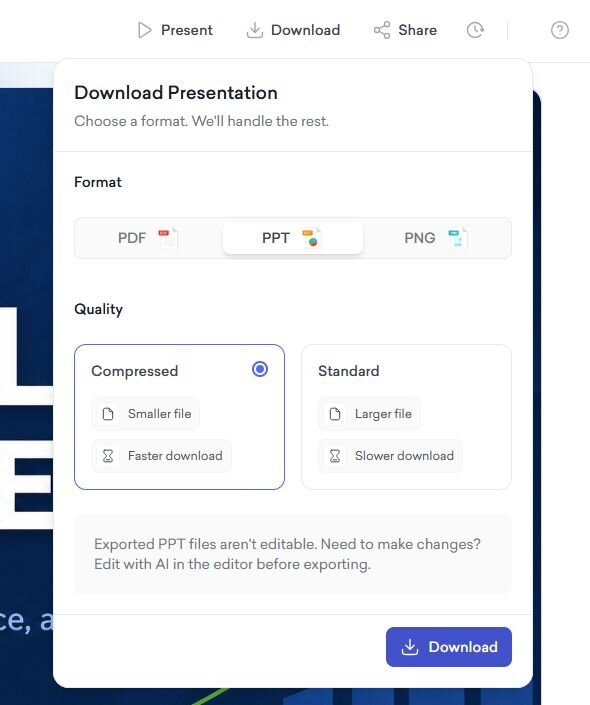
Export options: My PDF and PNG exports matched what I saw in the editor, so those came out fine. PPTX exports were the problem. Several slides came back as one flat image instead of editable text and shapes, so I couldn't click into a headline or move a chart once it landed in PowerPoint.
Data slides: I think this is the weak spot. The charts are decorative, fine for a single trend line and out of their depth once your numbers need deeper analysis behind them. In my testing, I ended up doing the analysis elsewhere and uploading a spreadsheet with the finished numbers instead.
The extras: Embedded lead-capture forms, voice recording, and slide analytics are the sleeper features. If your decks double as landing pages for sales proposals or webinar follow-ups, these are worth the subscription on their own.
Decktopus pricing
Decktopus sells subscriptions and meters the AI with credits. Here are the current tiers, per its pricing page:
Pro: $9.99 per user per month billed annually ($119.88 per year), with 9,000 AI credits per year.
Business: $19.99 per user per month billed annually ($239.88 per year), with 12,000 credits plus team features like custom domains, webhooks, and slide analytics.
Enterprise: Decktopus offers custom pricing, with corporate templates and document import.
Paying month to month costs more, at $24.99 per user per month for the Pro plan, and $49.99 per user per month for the Business plan.
📢 Watch the fine print: The pricing page states that subscriptions are non-refundable, monthly and annual alike.
How far do Decktopus AI credits go?
An AI deck generation costs 30 credits, so Pro's 9,000 credits work out to about 300 AI decks a year, or roughly 25 a month. That's generous for a solo user and tight for a team cranking out client decks daily.
💡 Tip: If you're not sold on Decktopus’ pricing model, consider checking out Gamma. Gamma is the rival Decktopus gets weighed against most.
What users say about Decktopus
Decktopus holds a 4.3 out of 5 on G2 from 66 reviews, and the distribution tells the story better than the average: 77% of reviewers give it five stars, 13% give it four, 9% give it one, and nobody gives it two or three. Most users are happy, but the unhappy ones tend to be very unhappy.
Here’s what people say on G2:
Pros
Speed and AI suggestions: "I love how intuitive it is! The AI suggestions for content and design save me so much time." - Dominik S., G2
Professional templates: “The templates are professional, and the ability to edit with AI is a game-changer." - Michal S., G2
No building from scratch: "Instead of building every slide myself, I can generate a draft, adjust the messaging, and move on. It makes the whole process feel much less repetitive." - Aygul M., G2
Cons
Export limitations: "Exported PPTX file are not editable, just images in slides." - Abdellatif A., G2
Reliability issues: "It's super buggy. ... Sometimes it crashes when trying to edit something. ... Random template slides appear in between, which makes it impossible to present." - Kristian P., G2
Not fully hands-off for technical content: "Like anything AI, it isn't 100% perfect. So if I'm creating something very specific, very technical, very linked to my feature or product, then I do usually make a few edits before I'm fully happy with the final version." - Julian M., G2
The export complaint matches what I saw in testing, and it's the one I'd weigh heaviest if handoff files matter to your workflow.
Who will love Decktopus (and who should skip it)
After spending time testing Decktopus and digging through the review record, I've landed on a simple way to think about it: the decision comes down to what your decks are for.
Choose Decktopus if you:
Need presentable decks fast and don't have a designer on call
Build simple sales or marketing decks where the numbers are supporting cast
Want lead-capture forms, voice recording, and slide analytics living inside your slides
Skip Decktopus if you:
Need pixel-level control over every slide element
Hand off editable PowerPoint files to clients or colleagues
Build data-heavy presentations where the charts carry the argument (a data-first tool like Julius is the better starting point there)
Sitting between the two lists? Seeing how Julius, Gamma, and Beautiful.ai compare head to head is the fastest way to figure out which camp you're in.
Turn your data into presentation-ready slides with Julius
If this Decktopus review leaves you with one takeaway, make it this: Decktopus is a fair buy when the deck itself is the deliverable. It runs into trouble once there's analysis underneath it, since deck tools often start working after the analysis is already done.
We built Julius to handle the step that comes before the deck, and the deck itself. You can ask a question about your data in plain English, get the analysis back, and carry the results straight into a presentation with the AI Presentation Maker.
Here's how Julius helps:
Ask in plain English: Type a question about your data and get charts, summaries, and full analysis back, no SQL or Python required.
Export slides people can edit: Once your analysis is done, you can use Julius's AI Presentation Maker to turn it into a deck, then export to PowerPoint, PDF, PNG, or Google Slides, so the handoff problem this review flagged for Decktopus doesn't show up here.
Stay on-brand: Julius lets you customize charts with your brand colors and fonts, so the visuals you build can match your deck's look instead of using generic defaults.
Start with zero upload: Julius can search the web for public data and compile it into a dataset, or pull institutional-grade financials for more than 17,000 companies through its Financial Datasets integration.
Connect your own sources: Link Postgres, Snowflake, BigQuery, Google Ads, Google Drive, Stripe, or Intercom when the data lives in your systems.
When the analysis underneath is solid, the deck stops being the hard part. Try Julius for free today.
Frequently asked questions
Is Decktopus free?
No, your first deck is free, but it comes with two limits. You can't export the file, and every slide carries a Decktopus watermark. Paid plans start at $9.99 per month, billed annually for the Pro tier, which removes both restrictions. Since subscriptions are non-refundable, it's worth testing that first free deck before you commit to a paid plan.
Can you export Decktopus presentations to PowerPoint?
Yes, Decktopus exports to PPTX, PNG, and PDF. Multiple G2 reviewers report exported PPTX slides arriving as flattened images that can't be edited in PowerPoint, so run a test export before you rely on the handoff.
Is Decktopus legit and worth it?
Decktopus is a legitimate tool with a 4.3/5 rating on G2, and it's worth it for fast, simple business decks. Weigh the editing limits, export fidelity, and no-refund billing terms before committing to an annual plan.
Does Decktopus offer refunds?
No, Decktopus does not offer refunds. The Decktopus pricing page states that both monthly and annual subscriptions are non-refundable. Test the free tier first if you're unsure about fit.
What's the best Decktopus alternative for data-heavy presentations?
Julius is the strongest alternative for data-heavy presentations: it analyzes your data through plain-English questions, then exports the results to PowerPoint, PDF, PNG, or Google Slides. For design-led decks, Beautiful.ai and Gamma are better fits.