Meta: Muse Wonder
Bring a task with several steps into Julius: reconcile your files, investigate exceptions, and explain the result.
Available on Pro, Max, Ultra, and Business. Compare plans
Reviewed · Sources
- Best suited to
- Planning and checking work across multiple steps
- Published context
- 1,048,576 tokens
- Native inputs
- Text, images, audio, video, and PDFs
- Released
- October 12, 2026
Muse Wonder pricing
Compare the provider’s API rates with access through Julius.
Prices in USD, reviewed October 13, 2026. API token charges are separate from Julius subscriptions and credits.
What is Muse Wonder?
Muse Wonder is Meta’s reasoning model for complex coding and long-running tasks. Its published API supports text, images, audio, video, and PDFs as input, with text output and a 1,048,576-token context window.
Meta describes Wonder as a model that can plan work, use tools, and recover from errors during a longer task. In Julius, try a bounded analysis with clear checkpoints, such as cleaning a file, checking the calculations, and writing up the findings.
Reconcile invoices without hiding payment exceptions
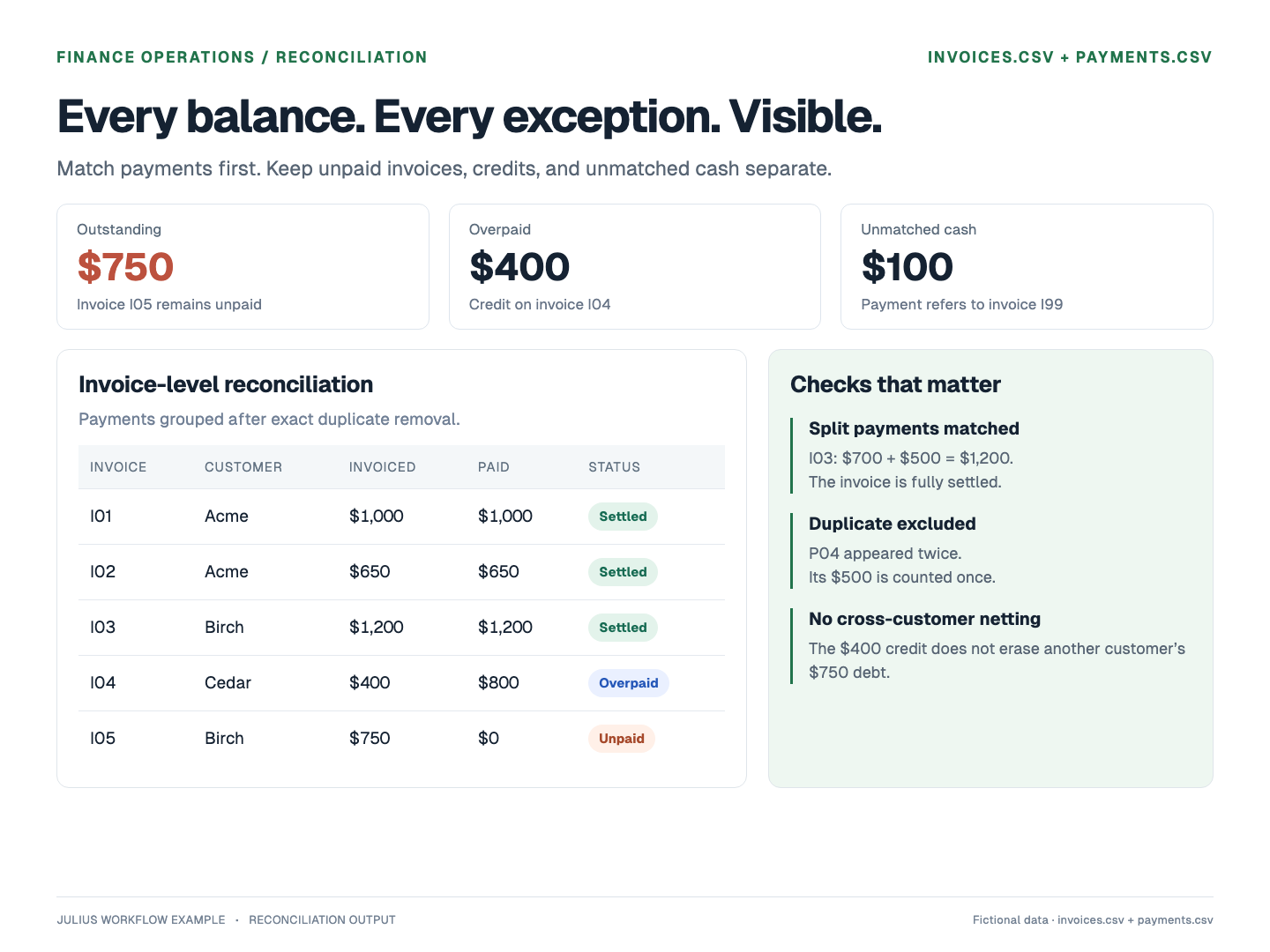
One invoice has split payments, one payment is duplicated, and one invoice is overpaid.
Worked example · Fictional sample data · Expected results calculated from the CSVs
1. Input
Invoices and payments
2. Check
Deduplicate, then match
3. Deliver
Balances and separate exceptions
View the prompt and sample data
Reconcile these invoices and payments. Deduplicate exact payment records by payment_id and flag conflicting duplicates. Sum split payments by invoice. Report outstanding balances, overpayments, and payments with no matching invoice separately. Do not offset one customer’s overpayment against another customer’s unpaid invoice. Create an exception table and a short reconciliation report.
invoices.csv
invoice_id,customer,amount
I01,Acme,1000
I02,Acme,650
I03,Birch,1200
I04,Cedar,400
I05,Birch,750
payments.csv
payment_id,invoice_id,amount
P01,I01,1000
P02,I02,650
P03,I03,700
P04,I03,500
P04,I03,500
P05,I04,800
P06,I99,100
These expected results come from the downloadable Python calculations. This example illustrates a workflow; it is not a measured benchmark of Muse Wonder.
Using Muse Wonder in Julius
Start with your task
The try buttons carry Muse Wonder 1.0 into a new chat when your plan includes it. Example buttons also fill the composer with the sample data. Review the prompt, or replace it with your own files and question, before sending.
If the model is unavailable on your plan, Julius explains the access requirement. You can choose another option in the model menu.
Know the boundaries
- Do not assume all Meta API modalities, computer-use features, or multi-agent features are exposed in Julius. Julius currently configures text and image input for this model.
- Muse Wonder Full is a separate Muse Code offering. The Julius menu provides Muse Wonder 1.0.
Model details and official research
Go to the original documentation for specifications, release details, and evaluation methods.
Muse Wonder: frequently asked questions
Is Muse Wonder available on Julius?
How much does Muse Wonder cost?
Can I use Muse Wonder Full on Julius?
Explore other models and research
Read the details, compare tradeoffs, and find another model for your work.