Moonshot AI: Kimi K3
Explore long-context research and reproducible analysis with Moonshot AI’s open-weight model.
Available on Pro, Max, Ultra, and Business. Compare plans
Reviewed · Sources
- Best suited to
- Long-context research and code-based analysis
- Published context
- 1,048,576 tokens
- Native inputs
- Text, images, and video (provider capabilities)
- Released
- July 27, 2026
Kimi K3 pricing
Compare the provider’s API rates with access through Julius.
Prices in USD, reviewed October 13, 2026. API token charges are separate from Julius subscriptions and credits.
What is Kimi K3?
Kimi K3 is Moonshot AI’s open-weight model for extended coding, research, and knowledge work. The published model card describes a multimodal architecture and a one-million-token context window.
Kimi K3 is useful to evaluate when a task combines a large amount of source material with several reasoning steps. In Julius, specify what the model should investigate and what decisions it should leave to you.
Build a retention table with the right denominator
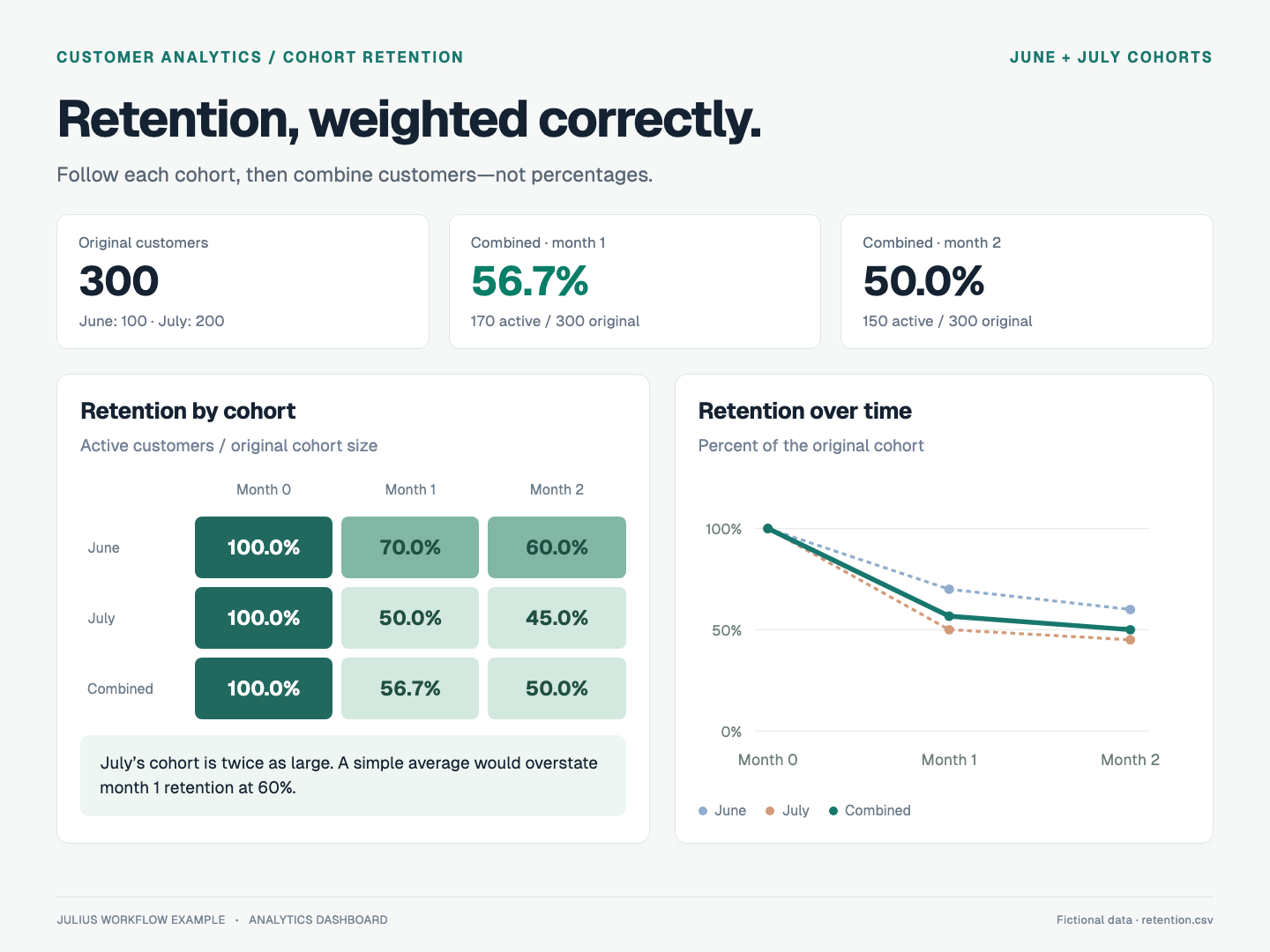
Two customer cohorts have different sizes. How should their retention be combined?
Worked example · Fictional sample data · Expected results calculated from the CSVs
1. Input
Cohort sizes and active users
2. Check
Weight by original cohort size
3. Deliver
Combined customer retention
View the prompt and sample data
Build a retention matrix by cohort and month since acquisition. Divide active customers by the original cohort size. Calculate combined retention using cohort-size weights rather than a simple mean of percentages. Both cohorts have complete observations through month 2. Produce a reproducible analysis and a short explanation of the denominator.
retention.csv
cohort,month_index,cohort_size,active_customers
June,0,100,100
June,1,100,70
June,2,100,60
July,0,200,200
July,1,200,100
July,2,200,90
These expected results come from the downloadable Python calculations. This example illustrates a workflow; it is not a measured benchmark of Kimi K3.
Using Kimi K3 in Julius
Start with your task
The try buttons carry Kimi K3 into a new chat when your plan includes it. Example buttons also fill the composer with the sample data. Review the prompt, or replace it with your own files and question, before sending.
If the model is unavailable on your plan, Julius explains the access requirement. You can choose another option in the model menu.
Know the boundaries
- The published model’s visual capabilities do not guarantee image or video support in every application. Julius’s current Kimi configuration is intended for text and tool-based workflows.
- Set explicit boundaries for open-ended tasks. A useful prompt says what to investigate, what to produce, and when to ask for input.
Model details and official research
Go to the original documentation for specifications, release details, and evaluation methods.
Kimi K3: frequently asked questions
Is Kimi K3 available on Julius?
How much does Kimi K3 cost?
Is Kimi K3 open source or open weight?
Explore other models and research
Read the details, compare tradeoffs, and find another model for your work.